What is Filter Pinning?
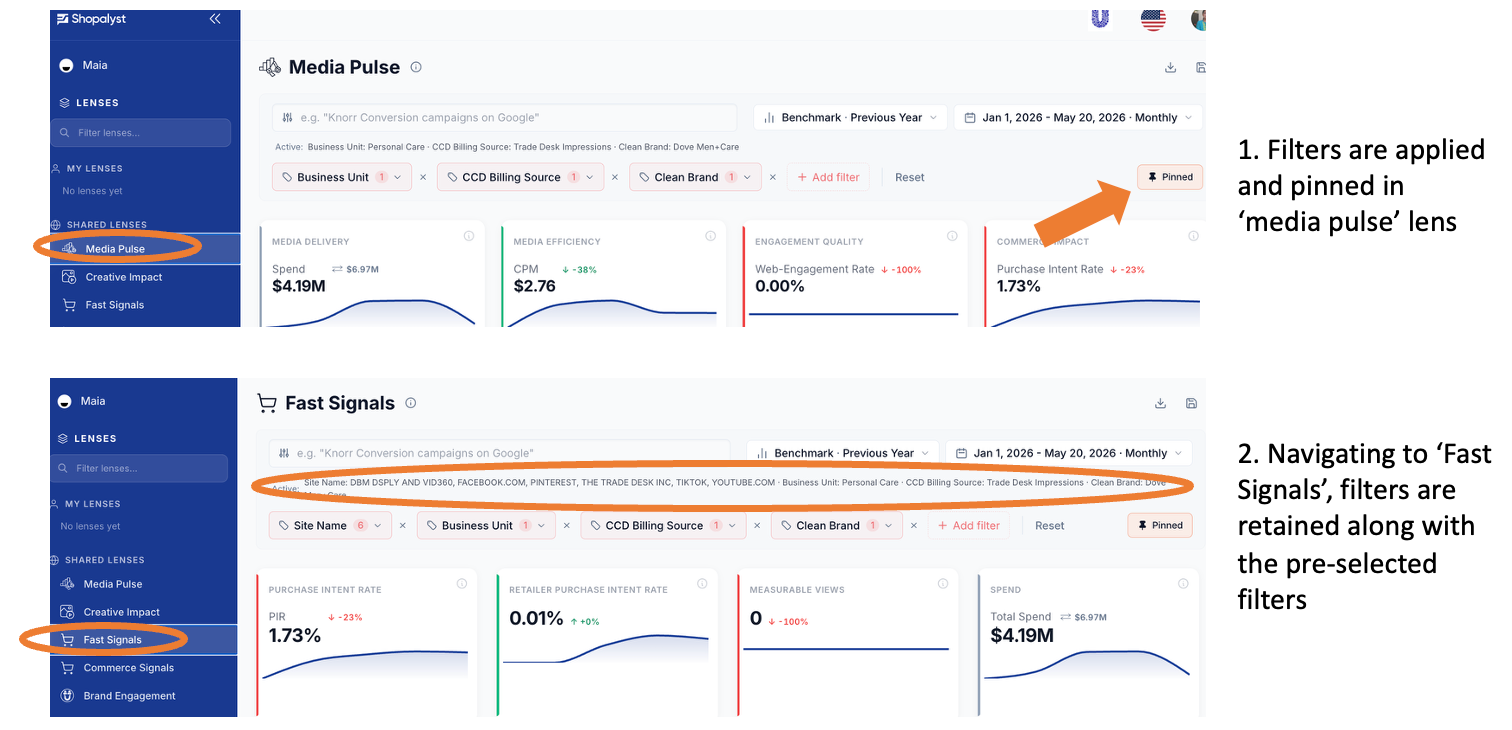
Filter Pinning globally locks filter selections, date ranges and benchmarks applying them across all platform lenses to eliminate repetitive setup during data analysis.
How It Works (Smart Merge)
Global Priority: Pinned selections override individual lens defaults.
Context Preservation: Untouched, lens-specific defaults (e.g., channel filters) remain active.
Visual Consistency: Timeframes and benchmarks carry over uniformly.
Key Actions & Behavior
Enable: Click Pin filters on the filter bar to lock active settings as the global baseline.
Browse & Edit: Navigating to new lenses automatically applies baseline settings. Updating any filter in real time updates the baseline for all subsequent views.
Reset: Restores original defaults for the current lens (or sets a new baseline if pinned).
Disable: Click Pinned to unpin. Each lens saves its current state to private memory and resumes independent filtering.
Quick Notes
Active Label: Summary of active filters appears directly below the search bar.
Private Memory: Unpinned lenses remember their last independent state when revisited during a session.
Was this article helpful?
That’s Great!
Thank you for your feedback
Sorry! We couldn't be helpful
Thank you for your feedback
Feedback sent
We appreciate your effort and will try to fix the article